MiniMax H3 is a multimodal video generation model, and its ComfyUI model files add up to nearly 40 GB. That raises an obvious question for anyone with a consumer GPU: can it run locally at all?
We ran the official ComfyUI workflow on an RTX 4080 SUPER with 32 GB of VRAM. It worked at both the default 864 × 480 and at 1920 × 1088, but “it runs” and “it’s practical” turned out to be very different things.
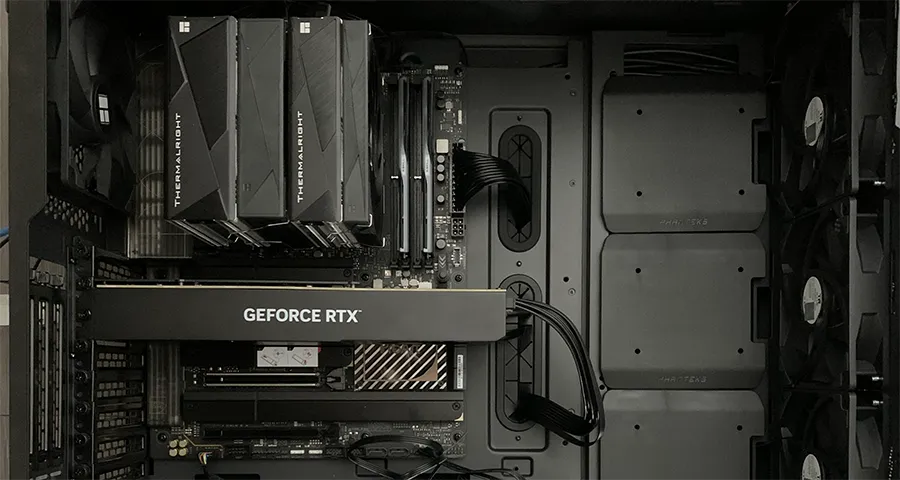
A note on the hardware: NVIDIA’s RTX 4080 SUPER ships with 16 GB of VRAM. The card used here is a blower-style card with an aftermarket upgrade to 32 GB, so these results won’t transfer directly to a stock card. For a 16 GB result, see our MiniMax H3 test on an RTX 5060 Ti 16GB.
Test setup
- GPU: RTX 4080 SUPER 32GB (modified, blower-style)
- System RAM: 64 GB
- Model storage: SATA hard disk drive (HDD)
- NVIDIA driver: 591.86 (Windows driver version 32.0.15.9186)
- ComfyUI: 0.30.0, official MiniMax H3 workflow template
- Clip length: 5 seconds
Getting the model files
After updating ComfyUI and opening the MiniMax H3 workflow, the first run reported four missing models and offered to download them:
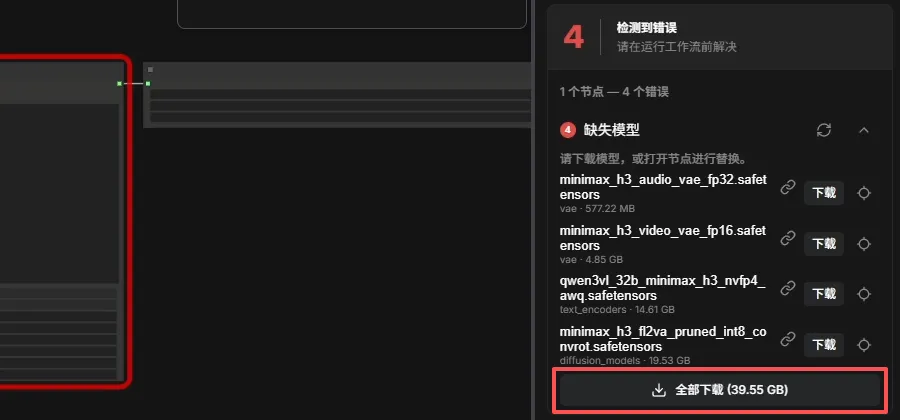
| Folder | File | Size |
|---|---|---|
diffusion_models |
minimax_h3_fl2va_pruned_int8_convrot.safetensors |
19.53 GB |
text_encoders |
qwen3vl_32b_minimax_h3_nvfp4_awq.safetensors |
14.61 GB |
vae |
minimax_h3_video_vae_fp16.safetensors |
4.85 GB |
vae |
minimax_h3_audio_vae_fp32.safetensors |
577.22 MB |
| Total | 39.55 GB |
Place each file in the matching folder under ComfyUI’s models directory:
models/
├── diffusion_models/
│   └── minimax_h3_fl2va_pruned_int8_convrot.safetensors
├── text_encoders/
│   └── qwen3vl_32b_minimax_h3_nvfp4_awq.safetensors
└── vae/
    ├── minimax_h3_audio_vae_fp32.safetensors
    └── minimax_h3_video_vae_fp16.safetensors
After refreshing the ComfyUI page, the workflow recognized all four models and the missing-model errors disappeared.
Why a 39.5 GB model can run on a 32 GB card
Model file size is not the same as VRAM use. MiniMax H3 is not one monolithic model. It is a pipeline of components that run in stages:
- Text encoder (Qwen3-VL-32B): a 32-billion-parameter model. At 16-bit precision its weights alone would be roughly 64 GB (32 billion × 2 bytes). This version is quantized with NVFP4 and AWQ, bringing the file down to 14.61 GB.
- Diffusion model: pruned and stored in INT8, at 19.53 GB.
- Video and audio VAEs: together about 5.4 GB.
Because the components are needed at different stages, ComfyUI does not have to hold all 39.55 GB in VRAM at once, and it can keep part of the weights in system RAM. As the resource numbers below show, that system RAM does a lot of work.
NVFP4 on an RTX 40-series card
The text encoder uses NVFP4, NVIDIA’s 4-bit floating-point format designed for the Blackwell architecture (RTX 50 series). The RTX 4080 SUPER uses the older Ada Lovelace architecture, which has no native FP4 Tensor Core support.
On this card, the NVFP4 weights therefore have to go through a compatibility path rather than native FP4 math. Depending on how ComfyUI implements it, that can cost some speed and change how much VRAM and system RAM are used. The quantization still helps: compressed weights are much easier to store and load than a 16-bit 32B model.
Test 1: 864 × 480 (default settings)
The workflow’s resolution selector uses a megapixels setting. The default of 0.4 megapixels at 16:9 produces 864 × 480 (both dimensions are multiples of 32).
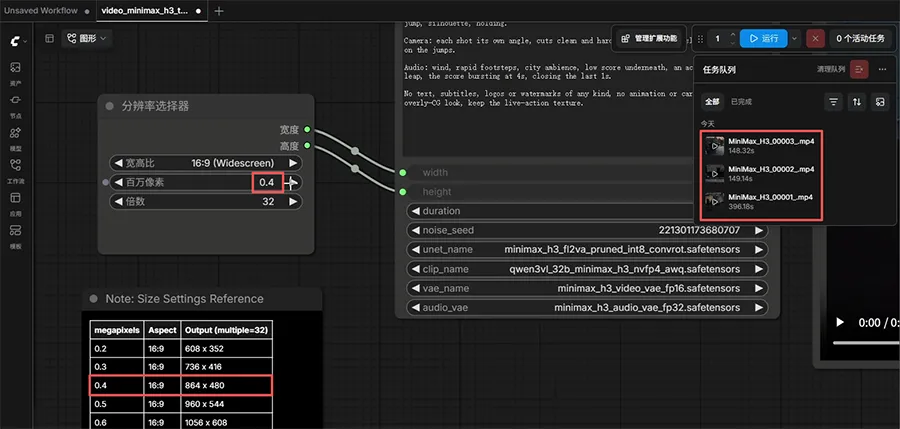
| Run | Time |
|---|---|
| First | 396.18 s |
| Second | 149.14 s |
| Third | 148.32 s |
Most of the extra time on the first run went into reading nearly 40 GB of model files from a hard disk, loading the weights, and initializing caches. Warm runs settled at about two and a half minutes.
VRAM and system RAM use
Task Manager during generation:
- Dedicated GPU memory: 31.6 of 32.0 GB
- Shared GPU memory: 26.0 GB
- System RAM: 53.5 of 63.6 GB
- GPU utilization: 94%
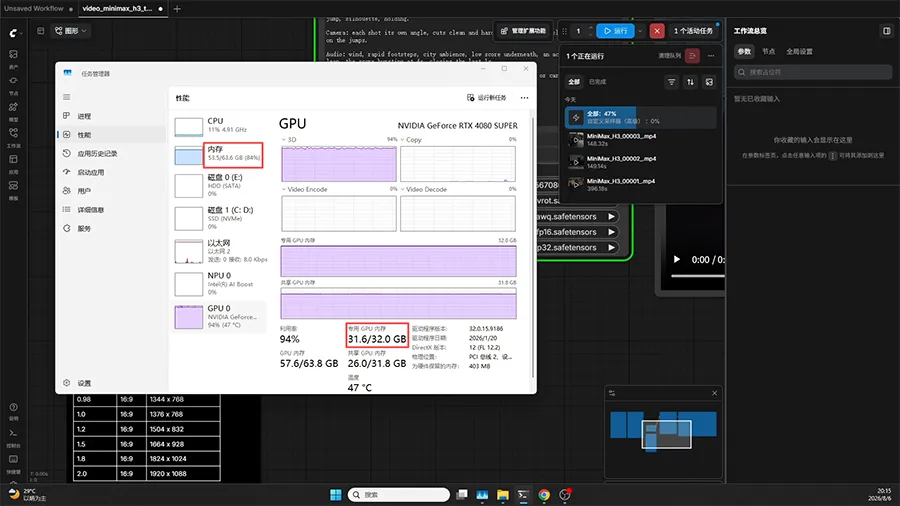
VRAM was essentially full, and 26 GB of shared GPU memory means a large share of the working data lived in system RAM. So “no out-of-memory error” here means ComfyUI completed the job by spilling over into RAM, not that the whole model fit in VRAM. The 32 GB card leaves far more room than a 16 GB card, but 64 GB of system RAM is carrying a lot of the load too.
Test 2: 1920 × 1088
Next, we raised the megapixels setting to 2.0, which produces 1920 × 1088.
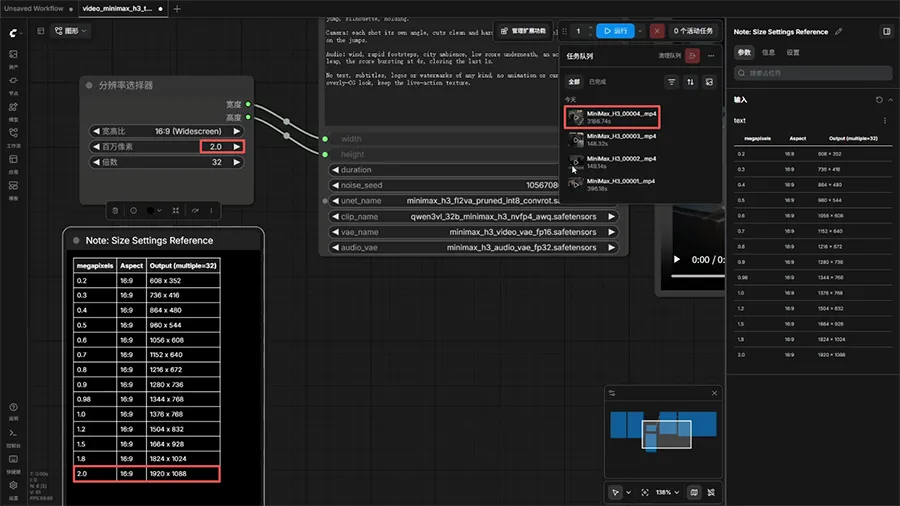
The run took 3,186.74 seconds (about 53 minutes) and completed without an out-of-memory error.
1920 × 1088 has about 5 times as many pixels as 864 × 480, but it took about 21 times as long as a warm 864 × 480 run (3,186.74 s versus 148.32 s). Video generation cost grows much faster than the pixel count. Being able to fit a 1080p job is a long way from being able to produce 1080p video efficiently.
For comparison, the same 1920 × 1088 job took 4,301.52 seconds on an RTX 5060 Ti 16GB.
Results summary
| Item | Result |
|---|---|
| Model files | 39.55 GB (4 files) |
| ComfyUI version | 0.30.0 |
| 864 × 480, first run (models on HDD) | 396.18 s |
| 864 × 480, warm run | about 148 s |
| Dedicated GPU memory | 31.6 of 32.0 GB |
| Shared GPU memory | 26.0 GB |
| System RAM | 53.5 of 63.6 GB |
| 1920 × 1088 | 3,186.74 s (about 53 min) |
| Out-of-memory error | No |
Takeaways
- Quantization makes local deployment possible. An INT8 diffusion model and an NVFP4 + AWQ text encoder bring a nearly 40 GB pipeline within reach of a 32 GB card backed by 64 GB of system RAM.
- Plan for system RAM, not only VRAM. This run used 53.5 GB of system RAM. A machine with less memory may hit limits even with the same GPU.
- Keep the models on an SSD. With the files on a hard disk, the first run took about four minutes longer than warm runs.
- Iterate at low resolution. At roughly 2.5 minutes per 864 × 480 clip versus 53 minutes at 1920 × 1088, test prompts at the default size and render at 1080p only when you’re happy with the result.
Useful? Explore more practical guides in the AICoreShop library.