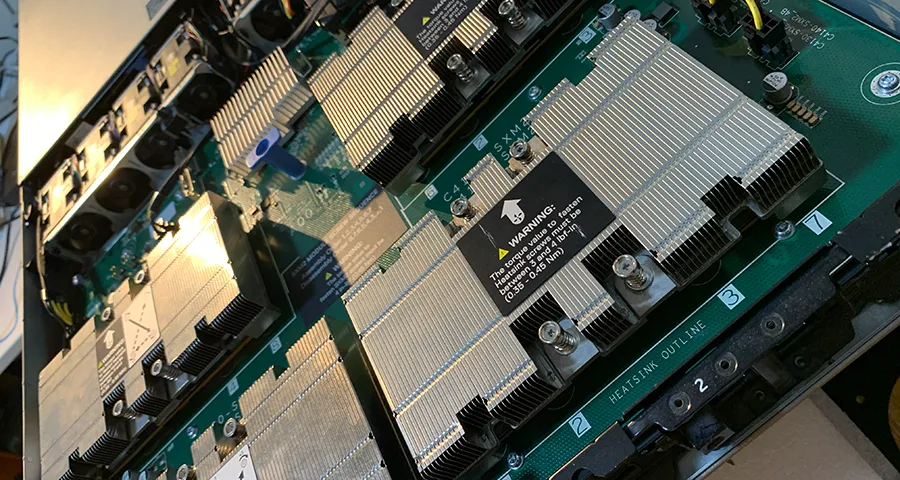
A Tesla V100 can run MiniMax H3. Both a 32 GB module and a 16 GB module finished a 5-second clip at 864 × 480. The 32 GB card took 19 minutes 29 seconds.
That is 4.0× as long as a warm run on an RTX 5060 Ti 16GB (293.84 s) and 7.9× as long as a warm run on a modified RTX 4080 SUPER 32GB (148.32 s). Extra VRAM did not make this video model fast.
Test setup
The two V100s are in separate multi-GPU servers. nvtop lists four Tesla V100-SXM2-32GB modules on one machine and four Tesla V100-SXM2-16GB modules on the other. Each timed run used a single module, the first device in nvtop. The other modules sat idle.
- GPUs: Tesla V100-SXM2-32GB, then Tesla V100-SXM2-16GB
- System RAM: the monitor reports 67.1 GB on the 32 GB server and 67.4 GB on the 16 GB server
- ComfyUI: 0.32.0 for the first 32 GB run, then 0.33.0
- Workflow: official MiniMax H3 text-to-video template
- Resolution: 0.4 megapixels at 16:9, which is 864 × 480, for 5 seconds
- Models: the same four files as the earlier tests, 39.55 GB in total
Each V100 result below is a single run. We did not repeat them. The 5060 Ti and 4080 SUPER figures are warm runs from other machines, on ComfyUI 0.32.0 and 0.30.0. Read the comparison as system against system.
V100 32GB on ComfyUI 0.32.0
The first 32 GB run finished in 00:19:29, which is 1,169 seconds.
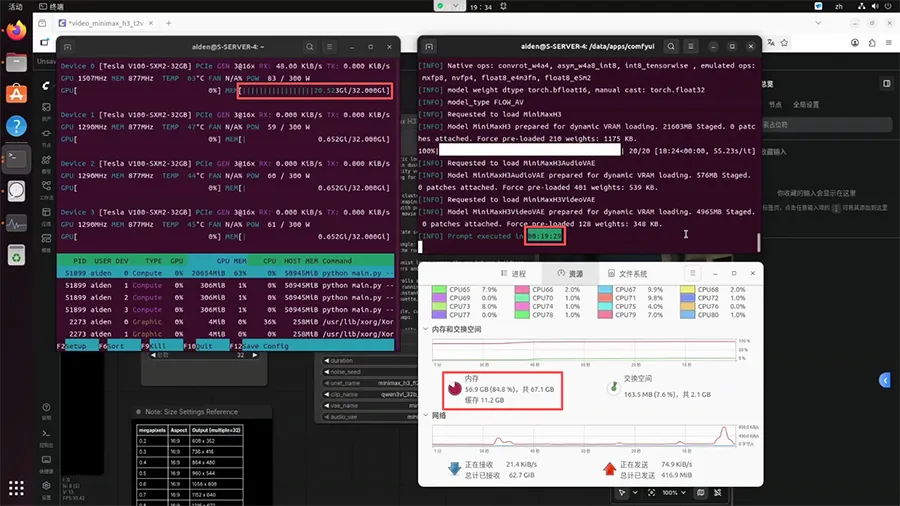
That screenshot was taken after the log line had already printed, and the card was drawing 83 W of a 300 W limit, so these bars are an end-of-run reading rather than a sample from the middle of sampling:
- GPU memory: 20.523 GiB of 32.000 GiB
- System RAM: 56.9 GB of 67.1 GB (84.8%), with 11.2 GB of cache
The same log separates ops the GPU can run itself from ops it has to emulate. Native ops include convrot_w4a4, asym_w4a8_int8, and int8_tensorwise. Emulated ops include mxfp8, nvfp4, float8_e4m3fn, and float8_e5m2.
ComfyUI 0.33.0 and the 8-step LoRA
ComfyUI 0.33.0’s default MiniMax H3 workflow on this V100 adds an 8-step turbo LoRA. In the node we ran, turbo_mode was false. The LoRA was still loaded:
- LoRA:
minimax_h3_fl2v_turbo_8step_v1.0_comfyui_bf16.safetensors - turbo_model_strength: 1.00
- turbo_steps: 8
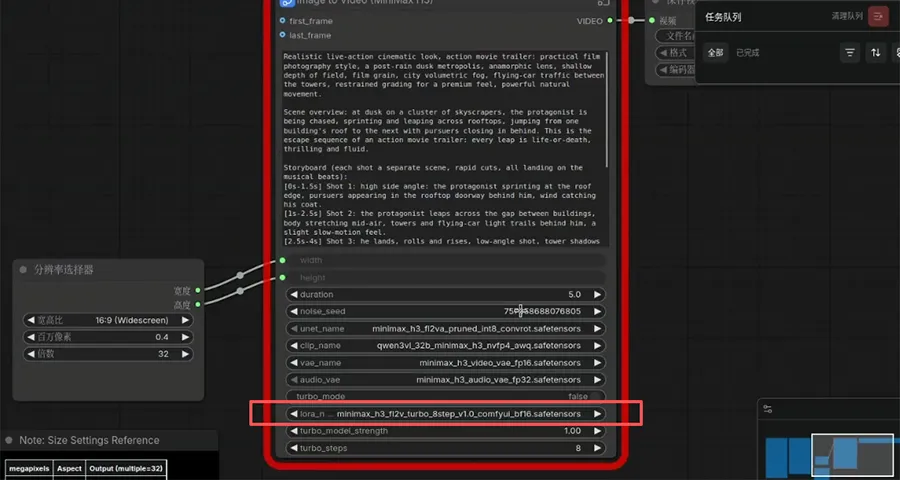
The resolution selector’s “32” is the multiple-of-32 rule for width and height, not a step count.
This run took 00:20:21 (1,221 seconds), 52 seconds longer than the 0.32.0 run. One pair of runs is not enough to say the LoRA always costs time. It did not speed this V100 up.
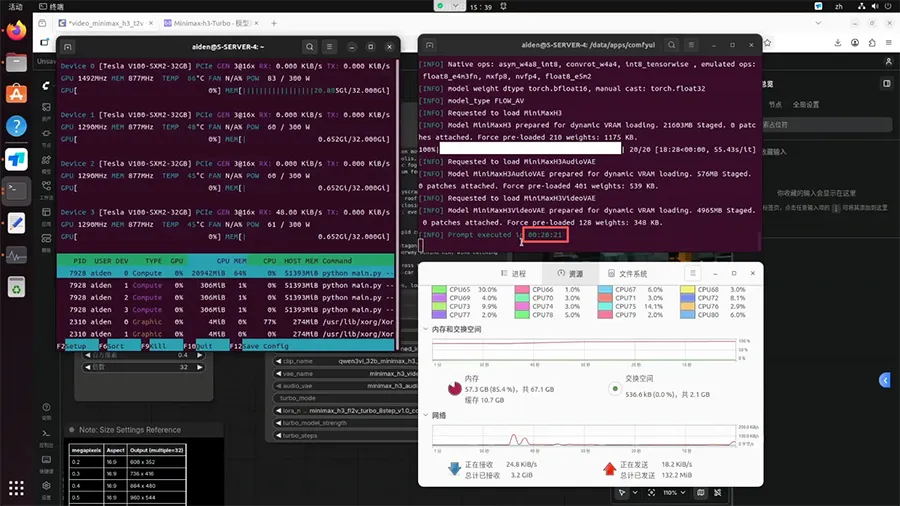
End-of-run readings on that frame: 20.805 GiB of 32.000 GiB GPU memory, and 57.3 GB of 67.1 GB system RAM (85.4%), with 10.7 GB of cache.
The 16GB V100 also finished
The 16 GB server ran ComfyUI 0.33.0 with the same LoRA settings. The log reads 00:20:15 (1,215 seconds).
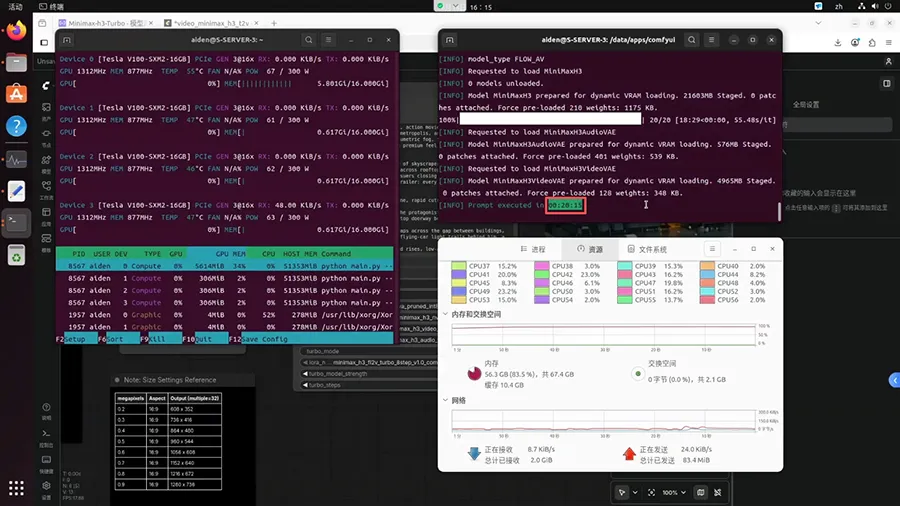
In the frame with that finished log, system RAM was 56.3 GB of 67.4 GB (83.5%), with 10.4 GB of cache. Another frame, taken while the card was busy, shows the memory that matters for the “will 16 GB fit?” question:
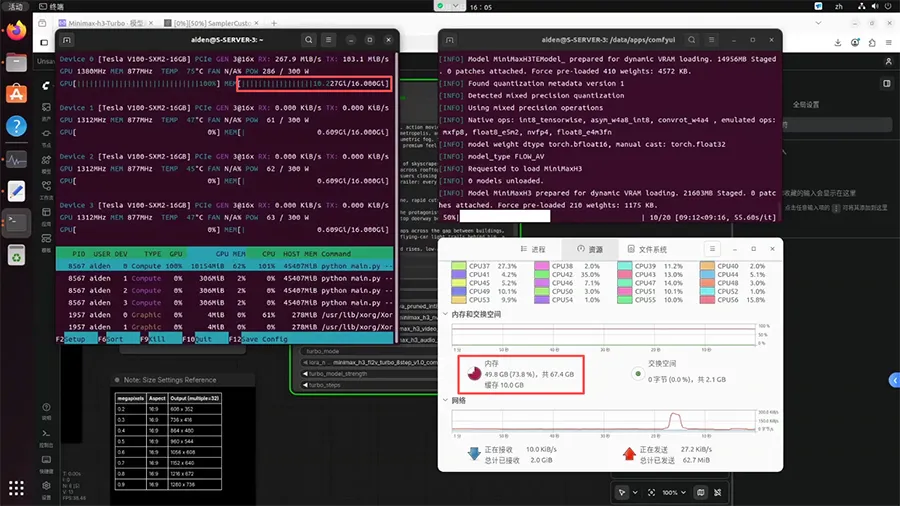
- GPU memory: 10.227 GiB of 16.000 GiB
- GPU utilization: 100%, 75 °C, 286 W of 300 W
- System RAM in that frame: 49.8 GB of 67.4 GB (73.8%), with 10.0 GB of cache
There was no out-of-memory error. The 16 GB module’s single 0.33.0 run finished 6 seconds sooner than the 32 GB module’s 0.33.0 run. These are different servers, so that gap is not a clean measure of VRAM size. It does show that dropping from 32 GB to 16 GB did not make this 864 × 480 job fail, and it did not make it meaningfully faster or slower.
Next to the 5060 Ti and the 4080 SUPER
| GPU | ComfyUI | Run | 864 × 480, 5 s |
|---|---|---|---|
| Tesla V100-SXM2-32GB | 0.32.0 | single run | 1,169 s (00:19:29) |
| Tesla V100-SXM2-32GB | 0.33.0, 8-step LoRA | single run | 1,221 s (00:20:21) |
| Tesla V100-SXM2-16GB | 0.33.0, 8-step LoRA | single run | 1,215 s (00:20:15) |
| RTX 5060 Ti 16GB | 0.32.0 | warm run | 293.84 s |
| RTX 4080 SUPER 32GB (modified) | 0.30.0 | warm run | 148.32 s |
Against the V100 32GB’s 1,169 s run, the 5060 Ti warm run is 4.0× shorter (1,169 / 293.84) and the 4080 SUPER warm run is 7.9× shorter (1,169 / 148.32). The V100 figures are single runs, so a later repeat could move them a little. It would not close a gap this wide.
The machines differ in more than the GPU: operating system, ComfyUI version, and whether the run was warm. Those are real confounders. They are not large enough to explain a 15-minute gap on a 5-second clip.
Why 32 GB of VRAM was not the advantage
The V100 is a Volta GPU, compute capability 7.0. MiniMax H3’s text encoder in this workflow is qwen3vl_32b_minimax_h3_nvfp4_awq.safetensors, an NVFP4 file. NVFP4 is a 4-bit format aimed at Blackwell (RTX 50 series). Volta has no FP4 Tensor Cores, and the ComfyUI log on this server lists nvfp4 under emulated ops.
That fits the result: a card with twice the VRAM of the 5060 Ti took about four times as long. The test cannot isolate architecture from the rest of the platform, but the emulated-ops line is direct evidence that this workload is not running in the format the file was quantized for.
File size is also the wrong number to watch. The pipeline is 39.55 GB, and the log still says each part is “prepared for dynamic VRAM loading.” On the 16 GB module the busy frame showed 10.227 GiB in use. The job fit because ComfyUI stages weights and keeps a large share in system RAM (about 50–57 GB on these servers), not because 32 GB was enough to hold the whole pipeline.
The 8-step LoRA is not on every GPU
After the move to ComfyUI 0.33.0, that turbo LoRA showed up in the default workflow on the V100. It did not show up on the RTX 4080 SUPER or the RTX 5060 Ti. An upgrade to 0.33.0 is not, by itself, a speedup for every card. On the V100, the run that included the LoRA was the slower of the two.
What a V100 is still for
For MiniMax H3 at this resolution, both V100s finish, and neither is practical. About 20 minutes for 5 seconds of 864 × 480 video is a poor reason to buy one. Reference images, video, or audio would add work on top of these text-to-video times.
A 32 GB V100 still has a use when the job is a text model that needs the memory. A 27B model that spills out of 16 GB is the case we measured in the Qwen3.6-27B comparison, next to the Gemma 4 12B comparison. Those are different machines from the servers in this video test.
Useful? Explore more practical guides in the AICoreShop library.