The LTX-2.3 test went to the RTX 5060 Ti: a newer architecture, half the VRAM use, more than twice the speed. Local chat is a different shape of problem. Qwen3.6-27B at Q4_K_M is an 18 GB model in Ollama. That fits in a 32 GB V100. It does not fit in a 16 GB RTX 5060 Ti.
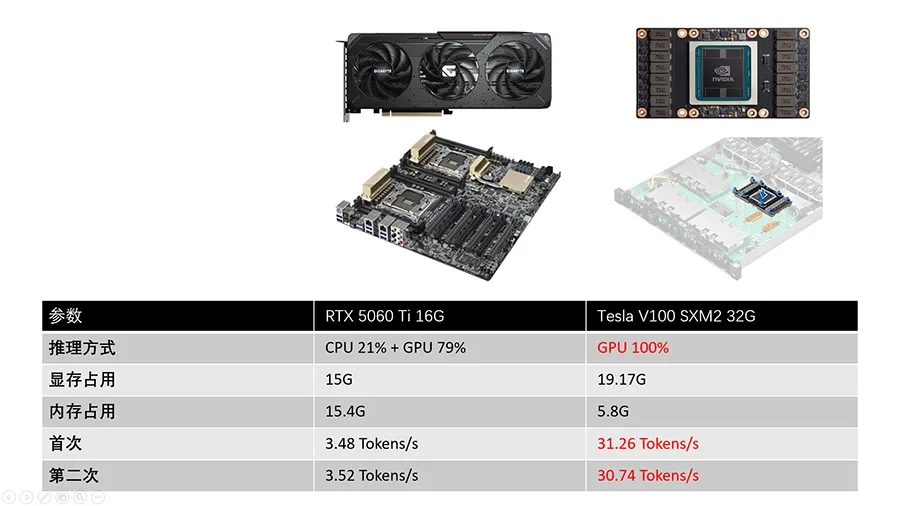
On the second run the split was worth 8.7×: 3.52 tokens/s on the 5060 Ti, 30.74 tokens/s on the V100.
Test setup
Same two machines as the video test. Ollama, running in Docker on both, with a 32,768-token context.
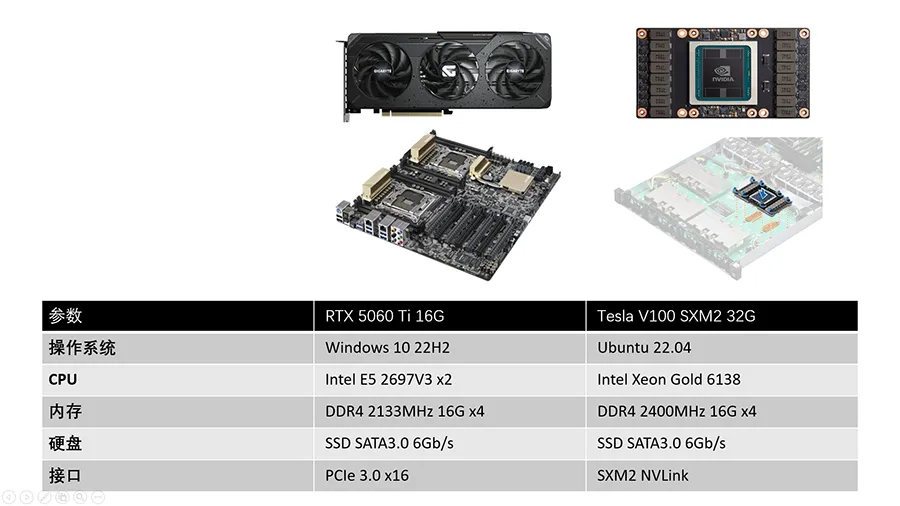
| RTX 5060 Ti 16GB | Tesla V100 SXM2 32GB | |
|---|---|---|
| OS | Windows 10 22H2 | Ubuntu 22.04 |
| CPU | 2 × Intel Xeon E5-2697 v3 | Intel Xeon Gold 6138 |
| System RAM | 64 GB DDR4-2133 | 64 GB DDR4-2400 |
| GPU link | PCIe 3.0 x8 (x16 slot, x8 card) | SXM2 |
| Runtime | Ollama in Docker | Ollama in Docker |
| Model | qwen3.6:27b, Q4_K_M, 18 GB, context 32,768 |
same model id a50eda8ed977 |
The 5060 Ti’s PCIe 3.0 x8 link is about 7.9 GB/s per direction, a quarter of the PCIe 5.0 x8 rate the card supports. Hold that number loosely. This test changes the CPU, the memory, the operating system, and the GPU at the same time.
Results
| RTX 5060 Ti 16GB | Tesla V100 SXM2 32GB | |
|---|---|---|
| Where it ran | 21% CPU / 79% GPU | 100% GPU |
| VRAM | 15.0 / 16.0 GB dedicated | 19.174 GiB / 32 GiB |
| System RAM in use | 15.4 / 63.9 GB | 5.8 GB |
| First run | 3.48 tokens/s | 31.26 tokens/s |
| Second run | 3.52 tokens/s | 30.74 tokens/s |
The screenshots are the second runs. The first-run speeds are from the summary sheet. Shared GPU memory on the 5060 Ti was only 0.2 / 31.9 GB, so Windows was not parking a large slice of the model in system RAM under another name. Ollama’s processor split is the spill: 21% of the layers on the CPU.
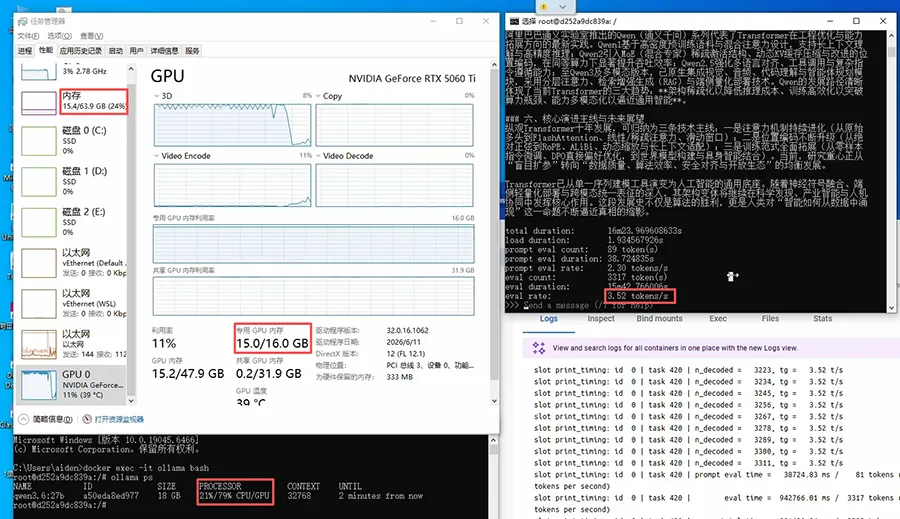
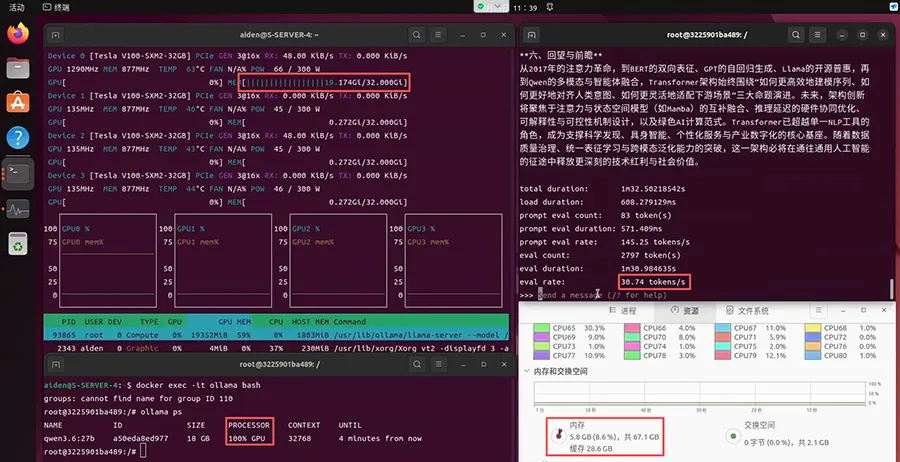
Second run: 30.74 / 3.52 = 8.7×. First run: 31.26 / 3.48 = 9.0×. Prompt processing on the 5060 Ti was slow as well, 2.30 tokens/s in the same screenshot, which fits a pipeline that keeps touching the CPU.
What the 8.7× is, and is not
The part this test actually isolates: the model fits in the V100 and does not fit in the 5060 Ti. Once Ollama puts layers on the CPU, every generated token waits on those layers. They are computed by a pair of 2014 Xeons from DDR4-2133. The GPU’s share finishes and then waits.
The test does not isolate PCIe bandwidth from the CPU and the memory. A later run moved this same RTX 5060 Ti, and this same 3.52 tokens/s model, to a Z790 DDR5 PC. Generation rose to 9.28 tokens/s without a different GPU. That is the platform-upgrade test. The V100’s 30.74 tokens/s is still 3.3× ahead of 9.28, which is what you would expect while the model remains too big for 16 GB.
A vLLM build did not start
We also tried to keep the 27B model on the 5060 Ti by using vLLM and a Blackwell-native NVFP4 checkpoint, instead of the Q4_K_M GGUF.
vLLM loaded a 24.57 GiB checkpoint (the log reports 24.18 GiB of memory used for the weights) and then refused to start:
Available KV cache memory: -2.06 GiB
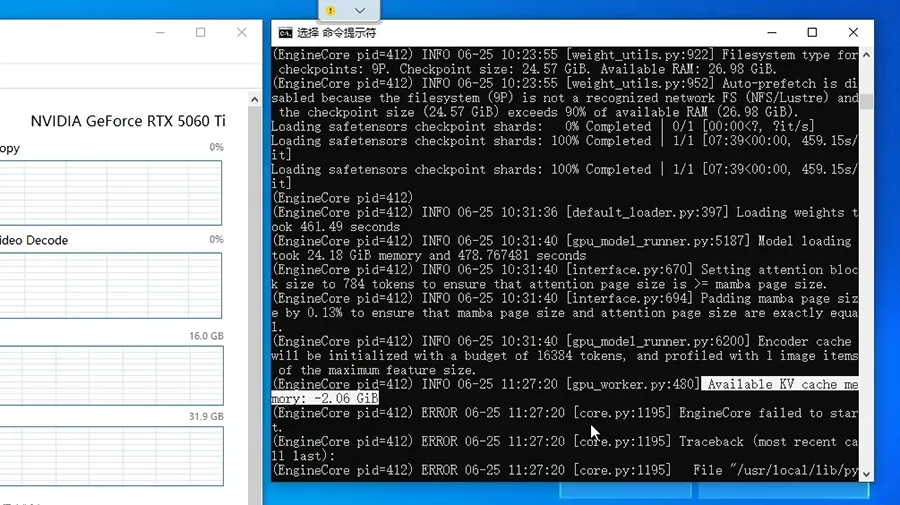
The engine never reached token generation. The checkpoint alone was larger than 16 GB, so there was nothing left to give the KV cache. NVFP4 did not create a 27B model that fits this card. A smaller quant, or a smaller model, is the lever that does.
What to run on 16 GB
At Q4_K_M, a model around 12B to 13B is the size that stays inside 16 GB with a 32K context. The next test swaps this 27B model for one that fits on both cards: Gemma 4 12B.
Useful? Explore more practical guides in the AICoreShop library.