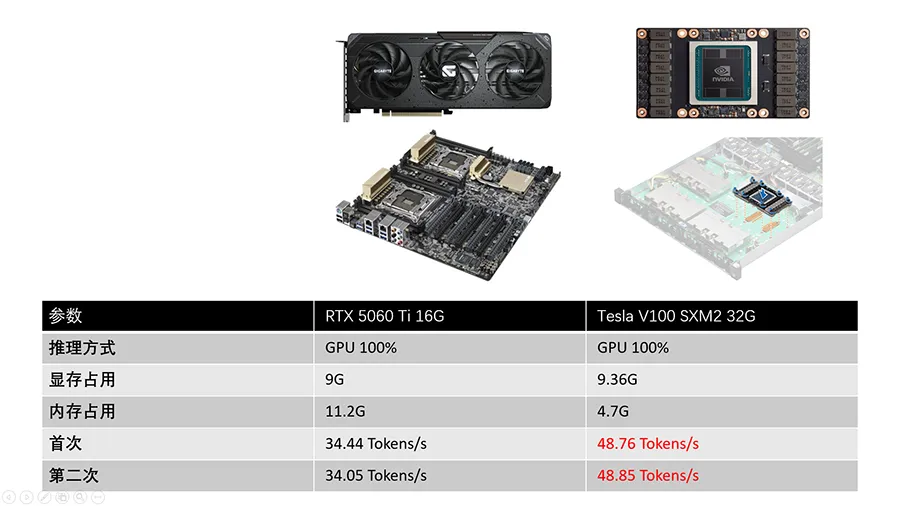
Qwen3.6-27B did not fit in 16 GB, so the RTX 5060 Ti had to share it with the CPU and the Tesla V100 pulled ahead by 8.7×. That result says more about capacity than about the two chips.
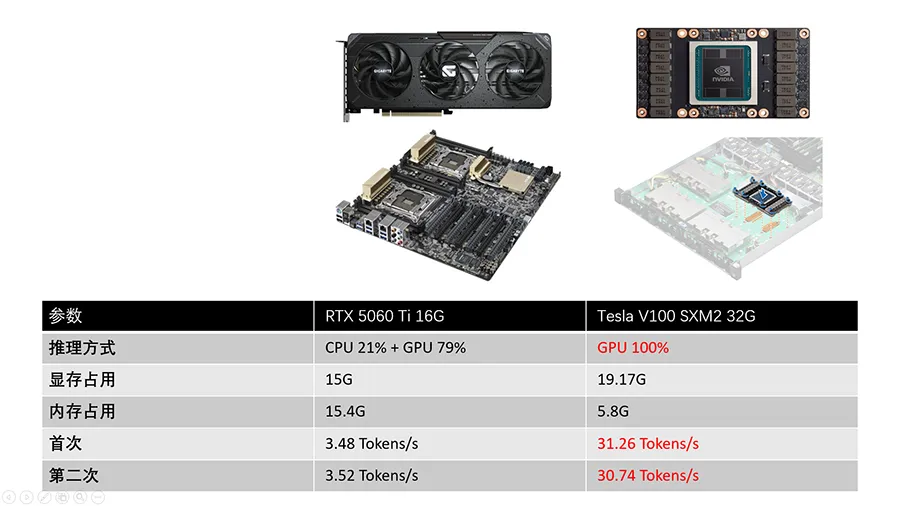
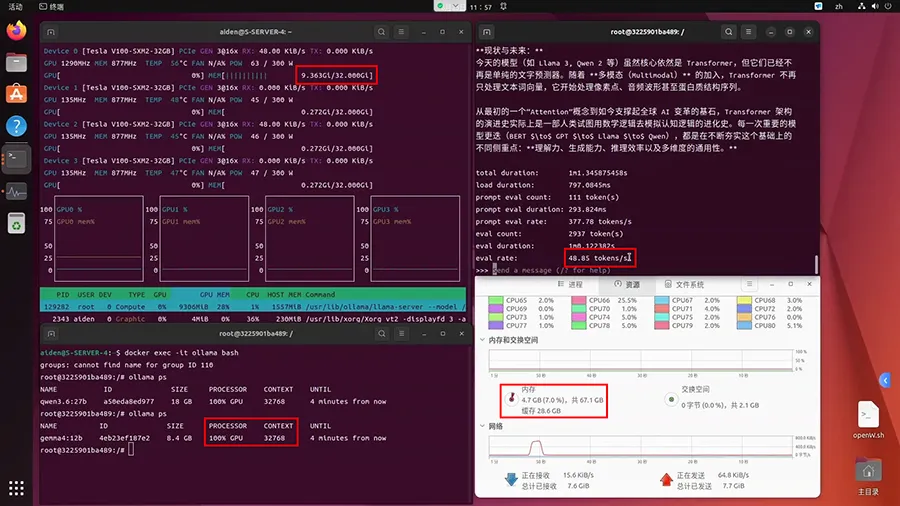
This run uses a model that fits in both cards. Gemma 4 12B Q4_K_M is 8.4 GB in Ollama. With a 32,768-token context, both GPUs ran it at 100% GPU. The V100 was still faster. On the second run it was 43% faster: 48.85 tokens/s against 34.05 tokens/s.
Test setup
Same machines, same Ollama-in-Docker setup, same 32,768 context. Only the model changed.
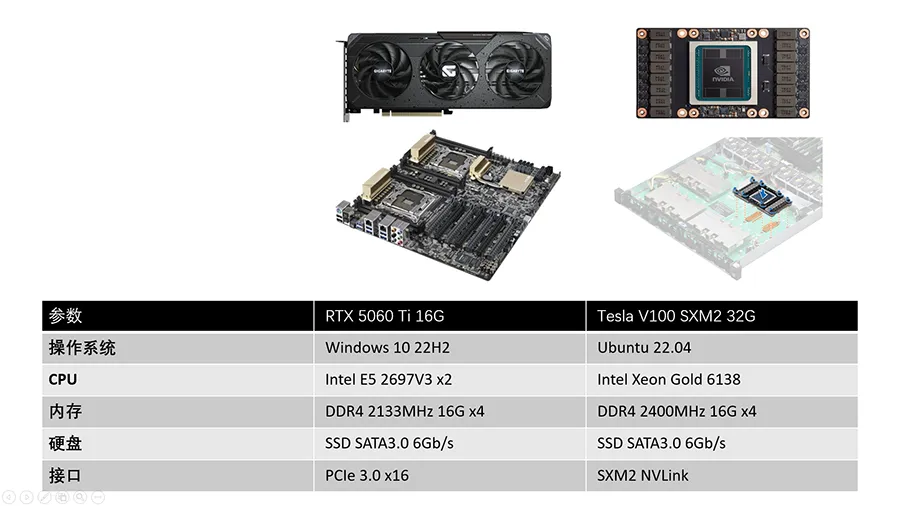
| RTX 5060 Ti 16GB | Tesla V100 SXM2 32GB | |
|---|---|---|
| OS | Windows 10 22H2 | Ubuntu 22.04 |
| CPU | 2 × Intel Xeon E5-2697 v3 | Intel Xeon Gold 6138 |
| System RAM | 64 GB DDR4-2133 | 64 GB DDR4-2400 |
| GPU link | PCIe 3.0 x8 | SXM2 |
| Model | gemma4:12b, Q4_K_M, 8.4 GB, context 32,768 |
same weights, id 4eb23ef187e2 |
Because the weights fit, generation does not have to ferry layers across PCIe on every token. The CPU and the link matter less than they did for the 27B model. They are not identical — the operating system and the host still differ — so this is still a system comparison. It is the closest these two machines come to showing the GPUs themselves.
Results
| RTX 5060 Ti 16GB | Tesla V100 SXM2 32GB | |
|---|---|---|
| Where it ran | 100% GPU | 100% GPU |
| VRAM | 9.0 / 16.0 GB dedicated | 9.363 GiB / 32 GiB |
| System RAM in use | 11.2 / 63.9 GB | 4.7 GB |
| First run | 34.44 tokens/s | 48.76 tokens/s |
| Second run | 34.05 tokens/s | 48.85 tokens/s |
The screenshots are the second runs. Ollama’s eval rate on the 5060 Ti is 34.05 tokens/s; the per-slot lines in that same log sit around 34.3–34.5 tokens/s. The first-run numbers are from the summary sheet. Task Manager showed 92% GPU utilization while the 5060 Ti was generating, with only 0.2 GB of shared GPU memory.
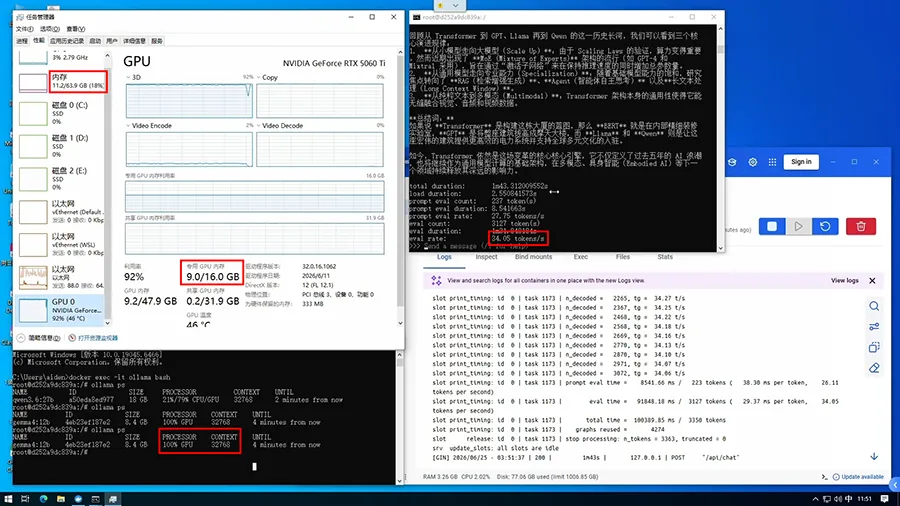
48.85 / 34.05 = 1.43, so the V100 was 43% faster. The other way around, the 5060 Ti reached 70% of the V100’s speed (34.05 / 48.85). Against its own 27B result, 34.05 is 9.7× the 3.52 tokens/s from the model that did not fit.
Bandwidth explains the direction, not the whole gap
With the weights resident in VRAM, token generation is mostly a stream of reads from GPU memory. The V100 SXM2’s HBM2 is rated at 900 GB/s. The RTX 5060 Ti’s GDDR7 is rated at 448 GB/s, about half. A memory-bound decode step should favor the V100, and it did.
The speed gap is smaller than the bandwidth gap: 1.43× versus about 2×. Clocks, tensor cores, the runtime, and the host operating system all still differ, so bandwidth is the likely main reason rather than a complete accounting. Blackwell’s FP4 and FP8 hardware does not show up as a win here, because this model is a Q4_K_M GGUF, not an NVFP4 checkpoint.
The platform still moves the 5060 Ti a bit
These 34 tokens/s were measured on the old X99 PC, at PCIe 3.0. Moving the same card to a Z790 DDR5 machine later raised the same Gemma 4 12B run from 34.05 to 40.05 tokens/s. That is the platform-upgrade test. The V100’s 48.85 tokens/s is then 22% ahead of the 5060 Ti, rather than 43%. Useful, and much smaller than the jump that same PC gave the 27B model, which still did not fit.
What to take from the pair of LLM tests
When the model fits, a 16 GB Blackwell card can land within a third of a 32 GB V100, even on a weak host. When it does not fit, the host and the spill dominate, and the newer GPU cannot express its architecture. For a 16 GB card, choosing a model that stays in VRAM changes speed by several times. Changing the GPU, once both cards hold the model, changes it by tens of percent.
Useful? Explore more practical guides in the AICoreShop library.