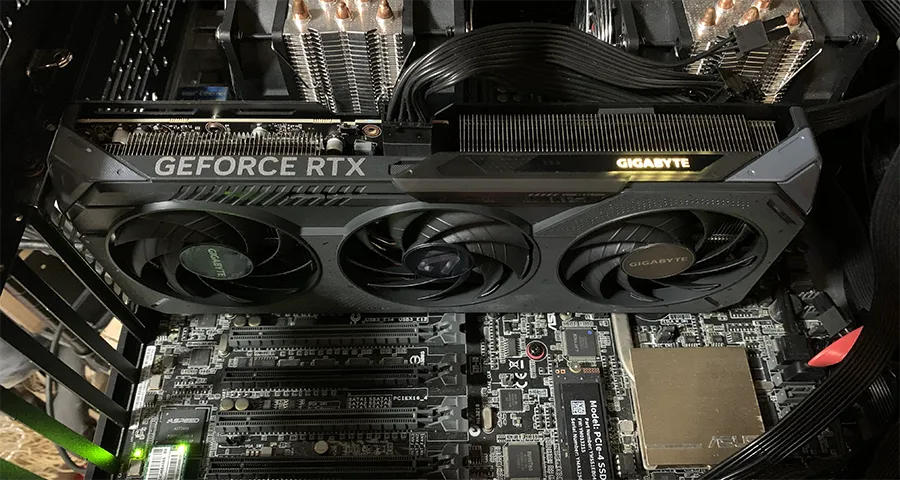
A Tesla V100 SXM2 32GB has twice the memory of an RTX 5060 Ti 16GB, a much wider memory bus, and — in June 2026 — a street price in the same range. The V100 had climbed past ¥3,500, and past ¥4,000 once you add an SXM2-to-PCIe adapter. We skipped the adapter and ran the V100 in the server it was built for. The job was LTX-2.3 text-to-video at 1280 × 720.
The 16 GB card won. Warm runs took about 100 seconds on the RTX 5060 Ti and about 260 seconds on the V100. The 5060 Ti’s recorded peak was 14.6 GB of VRAM. During the V100’s second run, nvidia-smi showed 29,902 MiB on the GPU doing the work.
This follows the card introduction. The buying criteria are in the 2026 GPU guide.
The two cards
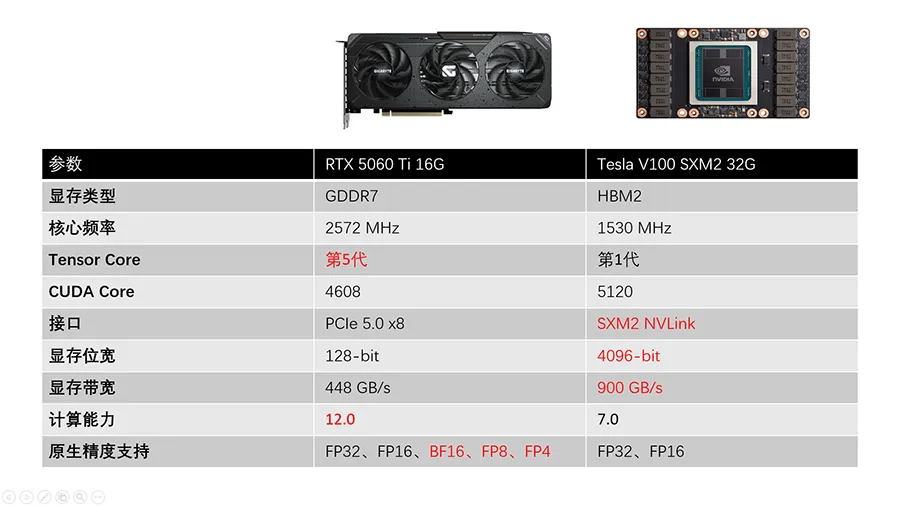
| RTX 5060 Ti 16GB | Tesla V100 SXM2 32GB | |
|---|---|---|
| Memory | 16 GB GDDR7 | 32 GB HBM2 |
| Boost clock | 2572 MHz (reference) | 1530 MHz |
| Tensor cores | 5th generation | 1st generation |
| CUDA cores | 4608 | 5120 |
| Interface | PCIe 5.0 x8 | SXM2 (NVLink) |
| Memory bus | 128-bit | 4096-bit |
| Bandwidth | 448 GB/s | 900 GB/s |
| Compute capability | 12.0 | 7.0 |
| Native low precision | FP16, BF16, FP8, FP4 | FP16 |
The tested 5060 Ti is a Gigabyte Gaming OC card rated at 2647 MHz. The table uses NVIDIA’s 2572 MHz reference boost, which is what the spec sheet in the photo uses.
Test setup
The cards did not sit in the same computer. Read the results as a whole-system comparison.
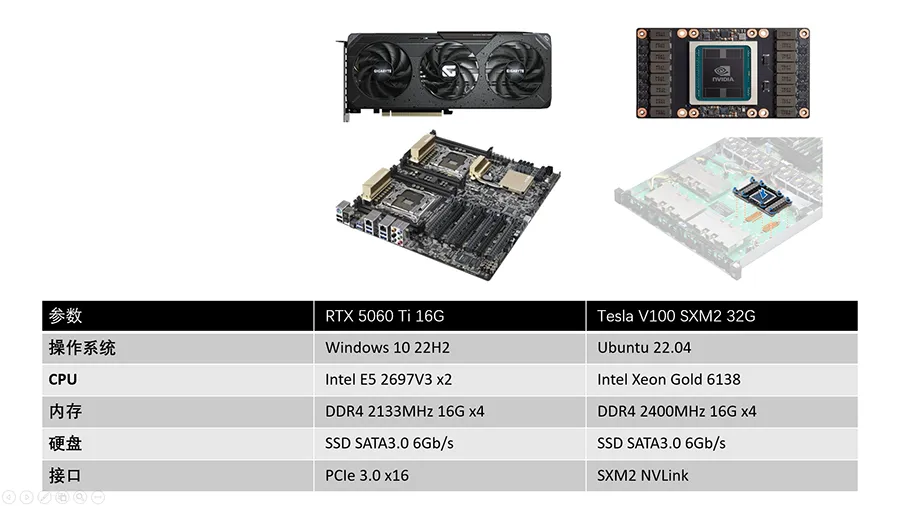
| RTX 5060 Ti 16GB | Tesla V100 SXM2 32GB | |
|---|---|---|
| OS | Windows 10 22H2 | Ubuntu 22.04 |
| CPU | 2 × Intel Xeon E5-2697 v3 | Intel Xeon Gold 6138 |
| System RAM | 64 GB DDR4-2133 (4 × 16 GB) | 64 GB DDR4-2400 (4 × 16 GB) |
| Storage | SATA SSD | SATA SSD |
| GPU link | PCIe 3.0 x16 slot; the card is x8, so the link is PCIe 3.0 x8 | SXM2 on the server board |
The 5060 Ti was on an ASUS X99 board. PCIe 3.0 x8 is about a quarter of the bandwidth of the PCIe 5.0 x8 link this card can use (about 7.9 GB/s versus 31.5 GB/s per direction). This video test did not measure that penalty on its own. A later platform move did, for language models.
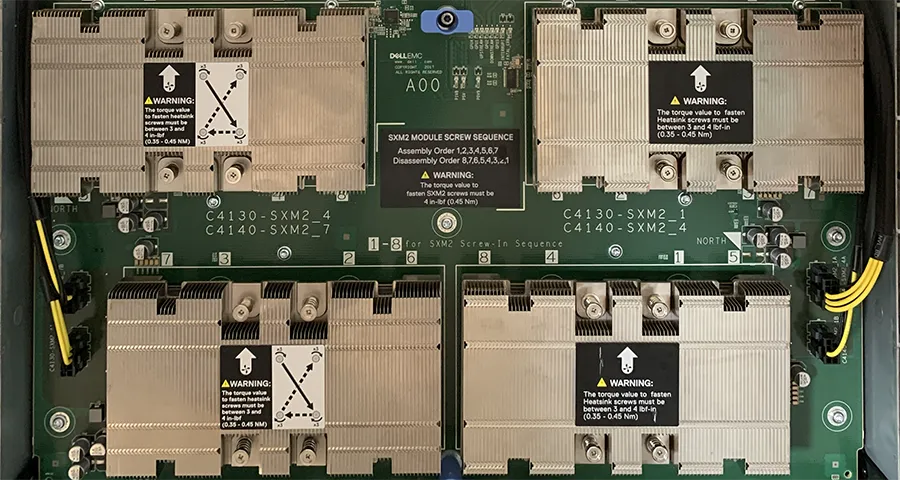
The V100 stayed on its native SXM2 board, a Dell EMC server tray with four SXM2 sockets. nvidia-smi shows four V100s. The render used one of them. We did not put the V100 behind a third-party PCIe adapter.
Software:
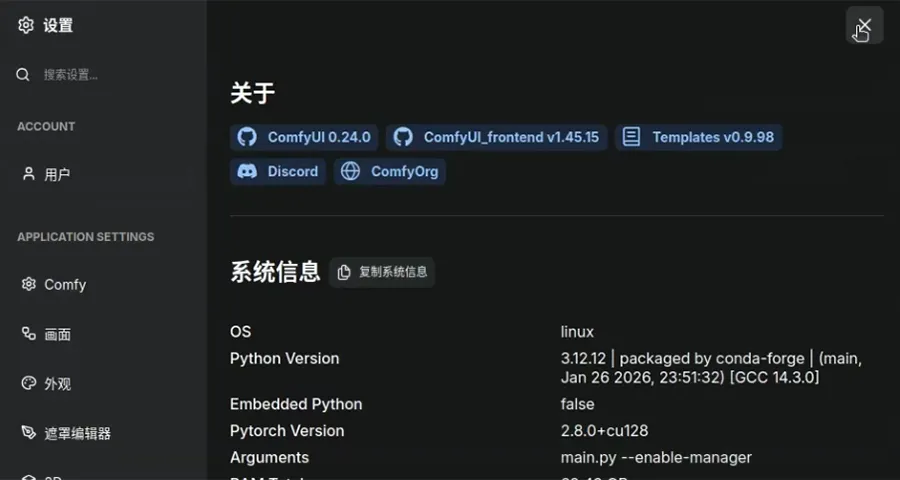
- ComfyUI 0.24.0 on both machines. The V100 machine’s About panel also shows frontend 1.45.15, templates 0.9.98, Python 3.12.12, and PyTorch 2.8.0+cu128 (CUDA 12.8). We do not have a matching About panel from the Windows machine.
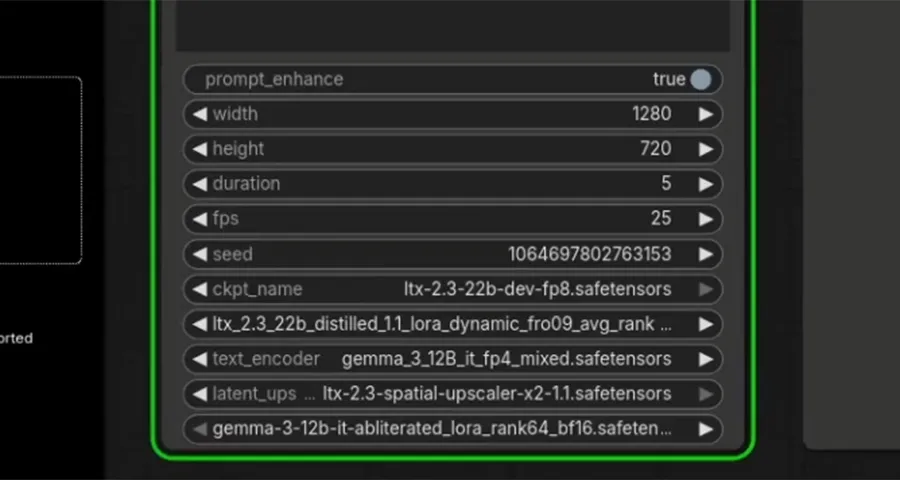
- Workflow: the default LTX-2.3 text-to-video graph, at 1280 × 720, 5 seconds, 25 fps, with prompt enhancement on.
- Models:
ltx-2.3-22b-dev-fp8.safetensors, a distilled LoRA, text encodergemma_3_12B_it_fp4_mixed.safetensors,ltx-2.3-spatial-upscaler-x2-1.1.safetensors, and a Gemma 3 12B LoRA. The set is about 40 GB of files. - Three generations on each machine. The first run pays for loading. The second and third are the warm runs.
Results
| RTX 5060 Ti 16GB | Tesla V100 SXM2 32GB | |
|---|---|---|
| First run | 300.40 s | 443.97 s |
| Second run | 104.81 s | 266.12 s |
| Third run | 99.93 s | 260.53 s |
| Peak VRAM | 14.6 GB | 29,902 MiB during the second run |
| System RAM | 34 GB | 35,630 MiB host memory during the second run |
The ComfyUI history confirms the first two 5060 Ti times (300.40 s and 104.81 s; the log line says “Prompt executed in 300.41 seconds”) and the first two V100 times (443.97 s and 266.12 s). The third-run times and the 5060 Ti’s 14.6 GB peak come from the summary sheet. The V100 memory figure is the nvidia-smi reading in the screenshot, not the 31 GB written on that sheet.
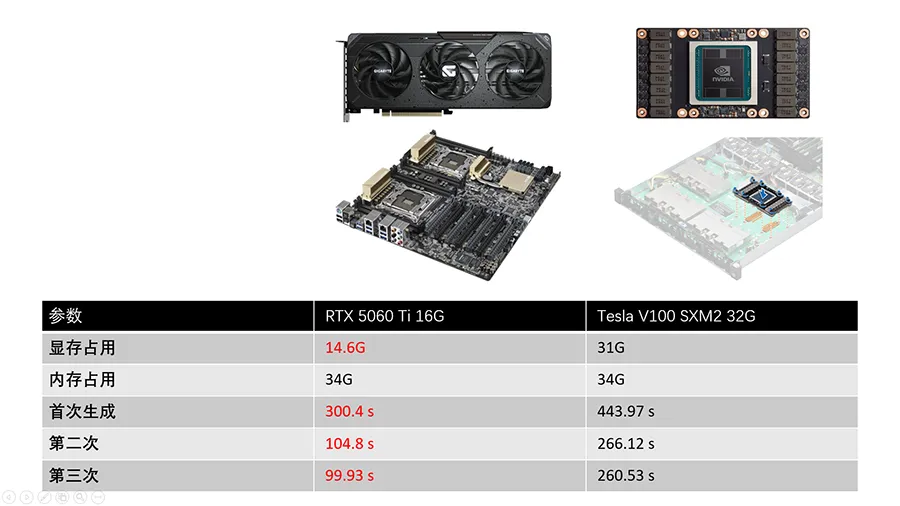
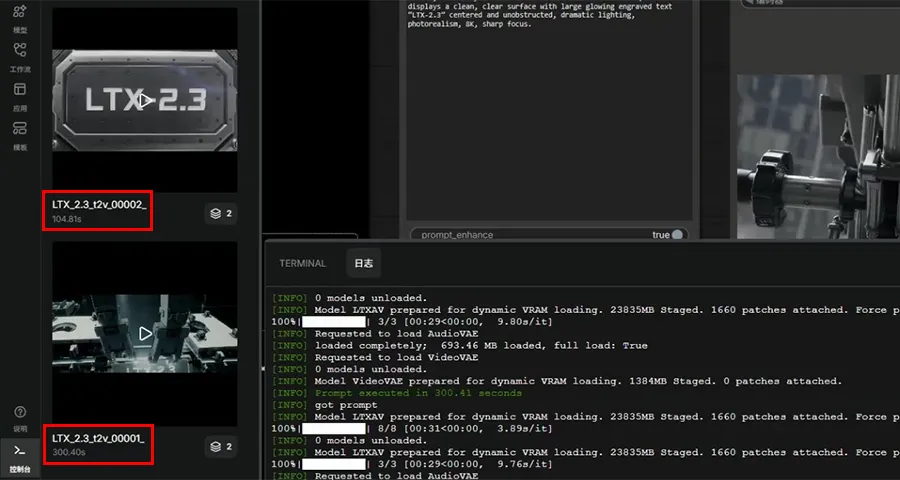
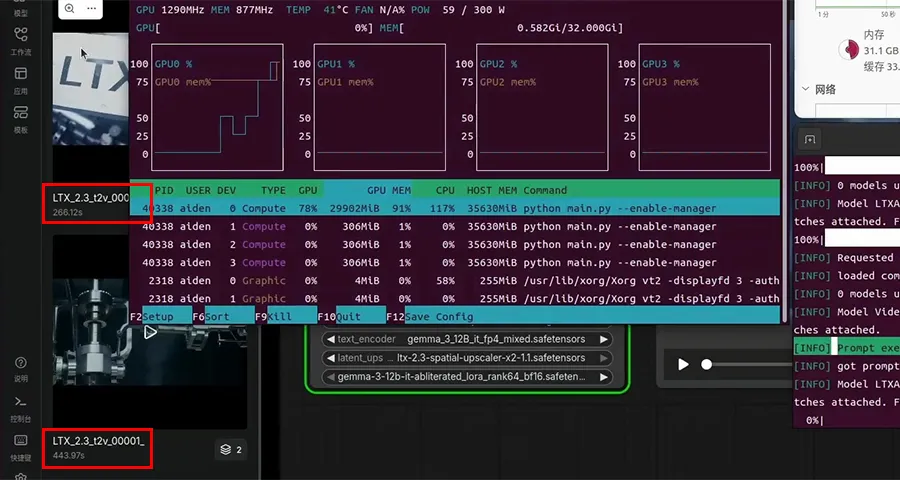
On the warm runs the 5060 Ti was 2.5× faster (266.12 / 104.81) and 2.6× faster (260.53 / 99.93). The first run was closer, 1.5× (443.97 / 300.40), because both machines spent time loading the models from a SATA SSD.
Why the smaller card used less memory and less time
The workflow’s checkpoint is FP8 and its text encoder is FP4. Blackwell runs both in hardware. Volta’s native low-precision format is FP16, so a V100 has to emulate the formats this graph is stored in. That is a credible reason for the V100 to spend about twice the VRAM — 29.9 GiB against 14.6 GB — on the same files.
It is not the only difference. The operating system, CPU, memory speed, and GPU interconnect all changed with the card, and ComfyUI’s own offload behavior depends on how much VRAM it can see. The result still answers the buying question we actually had: at the same price, the 2017 compute card was the slower way to run this 2026 video workflow.
A V100 on PyTorch 2.8 + CUDA 12.8 still ran the job. CUDA 13 no longer builds for Volta, so this is a card to keep using, not a card to buy as a new local-AI GPU.
What this does not decide
Video models that fit, even tightly, played to the newer architecture. A language model that does not fit in 16 GB is a different question. That test is Qwen3.6-27B Q4_K_M on the same two machines.
Useful? Explore more practical guides in the AICoreShop library.